

Fashion Workroom
Build it with your agent
Your agent sets up Runway Dev, asks what to change, then builds your version.
A cropped boxy denim jacket with oversized patch pockets, contrast topstitching and a wide spread collar.
Design brief
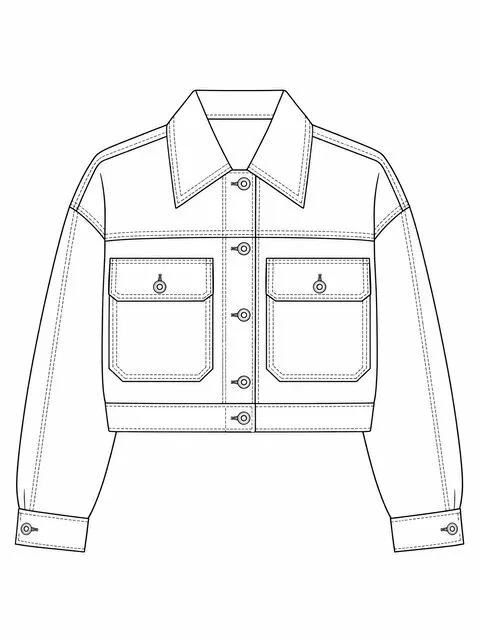
Sketch
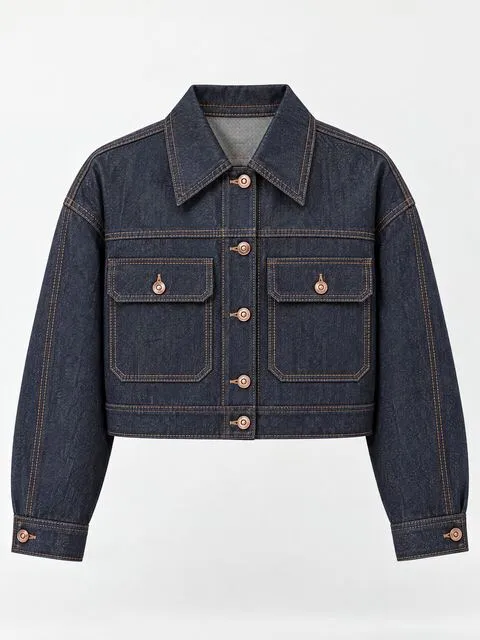
Fabric
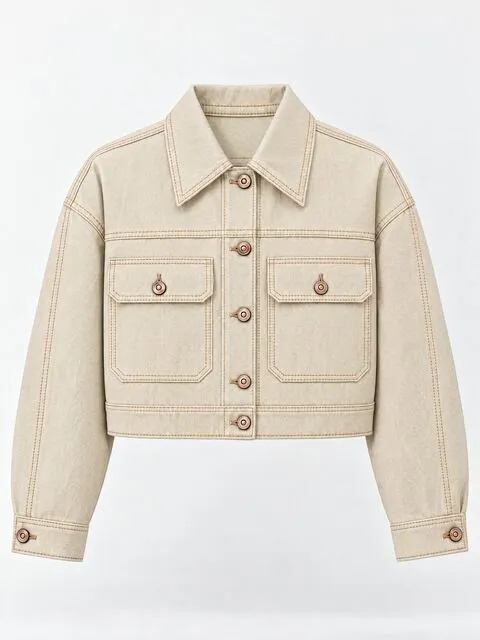
Colorway
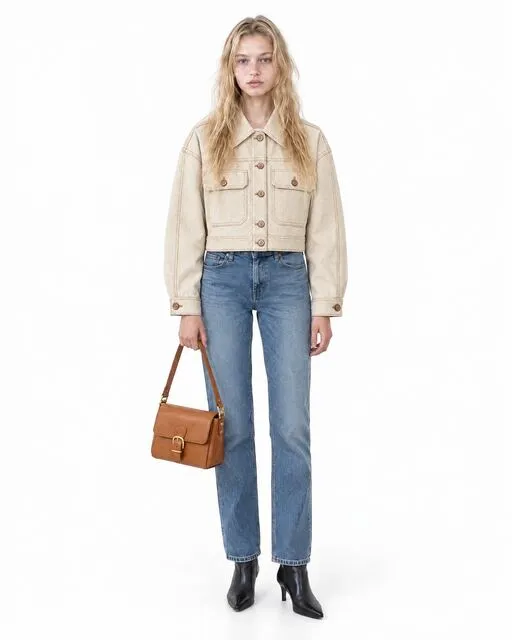
On the model
On location
Build it with your agent
Your agent sets up Runway Dev, asks what to change, then builds your version.
A staged workroom for a design team. A garment moves through Design, Product Studio, Casting, In Studio and On Location; every stage can pick earlier results as references and give each one a role: garment, model, look or reference. Two Model Routers, Preview and Quality, choose the model for every press.
What your agent will ask you
- Which stages do you need? Design, Product Studio, Casting, In Studio, On Location.
- What garments? The spec vocabulary (flats, laydowns, ghost mannequin) adapts to them.
- Your house style, as a sentence or two reference images.
- Default to the Preview router (cost) or the Quality router?
- Where do collections live? Default: local disk.
How it works
| Step | Runway call |
|---|---|
| Sketch & render in fabric | generate/image · preview router |
| Colorways (per swatch) | generate/image · 512px |
| Product studio & casting | generate/image · router |
| On-model video | generate/video · router |
The build spec carries every image and video prompt the reference app sends, word for word, from the session the replay shows.
The prompt
Build me a Fashion Workroom app with Runway Dev. It takes a garment from sketch to fabric render, colorways, product shots, a cast model and an on-location shoot, in stills and motion.

1. Set up Runway Dev first: read https://dev.runwayml.com/quickstart.txt and follow it.
2. Then build the app from https://dev.runwayml.com/learn/fashion-workroom.md. Ask me the questions it lists before writing any code.
The build spec
The prompt points your agent at this file. It defers to the live docs for field names, models and prices.
fashion-workroom.md
Fashion Workroom — build spec
A staged image-and-video workroom for fashion teams: sketch, fabric, colorways, product shots, casting, studio and location.
Before you start
- Follow https://dev.runwayml.com/quickstart.txt. Install
runway-devandrunway-dev-model-routers. - Create two routers once: Preview (optimise for cost) and Quality (optimise for quality). Every press is one request to a router; the router picks the model.
Ask the user first
- Which stages to include (Design, Product Studio, Casting, In Studio, On Location).
- Garment types and the vocabulary the team uses.
- House style: a sentence, or reference images to upload.
- Default router: Preview or Quality.
- Stack. Default: Next.js (the reference build is Vite + React + tRPC).
What to build
A left rail of stages. Each stage: a prompt built from option pickers, a reference picker that browses every earlier result and assigns each a role (garment, model, look, reference), and a Generate button showing the price. An Assets view keeps collections, favourites and recently deleted.
Pipeline
| Step | Runway call | Est. credits |
|---|---|---|
| Upload references | POST /v1/uploads |
0 |
| Still (any stage) | POST /v1/generate/image with the router’s configId |
5–7 on Preview |
| Clip | POST /v1/generate/video with the router’s configId |
depends on the picked model |
Prompts
These are the prompts the reference app sent, word for word, in the session the page replays: one cropped denim jacket, taken from a sketch to an on-location clip. Keep their fixed wording and fill in what changes: the garment, the options the user picks and the user’s own direction.
The app builds every prompt the same way:
- Prose, in the order a photographer calls the shot, never a keyword list: the stage’s opening sentence, then what each reference image is for, then the options picked (shot, pose, setting, lighting, styling), then a closing line on the finish.
- Every image gets a role. The request carries its images in order, so the prompt names each one by position (
img1,img2…) and says what to take from it and what to leave. An image with no stated role is one the model invents a role for. - The prompts below preserve the reference session’s exact selected roles and counts. When building a prompt, construct its role clauses, reference tags and accessory count from the references the user actually selected. Include styling-piece clauses only for selected styling references; omit those clauses when there are none.
- The user’s words go last, after
Additional direction:, capped at 400 characters. The fixed clauses are never cut to make room.
Design: sketch
What follows “Make it” is the drawing type the user picks.
Draw a fashion design sketch of a single garment on a clean white page. Make it a black-and-white technical flat: even line weight, symmetrical, no shading, no figure, laid out square to the page. A cropped boxy denim jacket with oversized patch pockets, contrast topstitching and a wide spread collar.The other drawing types:
a rendered fashion illustration with ink line and light wash, showing drape and movementa production tech-pack CAD: crisp vector-weight black line work on plain white, dead-square to the page, the front and back side by side at the same scale, drawn flat with even line weight
Design: render in fabric
img1 is the sketch.
Render this garment as a photorealistic sample in real fabric, lit by a large soft north-facing window against a plain seamless backdrop. The garment is the one drawn in the reference image tagged "img1", a technical flat or hand sketch, realised as a real physical garment. Follow that drawing's silhouette, proportions, seam lines, closures, pockets and topstitching exactly — it is a specification of the garment, not an inspiration for one. Straight-on front view at chest height, the garment squared to camera. The garment is the only subject in the frame: it stands on its own against the background, one continuous photograph with the whole picture given over to the garment and the empty sweep behind it. Photorealistic studio product photography, sharp focus edge to edge, true-to-life colour, the fabric's weave, surface texture and drape all clearly legible. No text, captions, watermarks, logos, borders or extra figures. Additional direction: Deep indigo rigid selvedge denim, orange contrast topstitching, copper shank buttons, crisp and unwashed.For the back, the view sentence becomes:
Back view: the garment seen from directly behind at chest height. Show the back panel, back neckline and collar stand, yoke, back seams, darts and any back closure. The camera sees the back of the garment only, with the front turned away from it. Infer the back construction from the front drawing's seams, closures, silhouette and length, keeping proportion, length and fabric consistent with the front.Design: colorway
img1 is the rendered garment.
Keep this garment identical in cut, construction and framing, and change only its surface. Re-render the exact garment shown in the reference image tagged "img1", in a new colorway. Keep the silhouette, seams, construction, drape, camera angle, framing, crop, scale, lighting, shadows and background completely identical — only the fabric changes. Re-render the garment in a solid Ecru colorway, hex #DDD3BE. Recolour the fabric only: preserve the weave texture, sheen, folds and shadow detail, moving hue and saturation rather than flattening the surface. Trims and hardware keep their original finish, except where they are self-fabric and take the new colour with the rest. Photorealistic studio product photography, sharp focus edge to edge, true-to-life colour, the fabric's weave, surface texture and drape all clearly legible. No text, captions, watermarks, logos, borders or extra figures.Product Studio
img1 is the garment. This is the ghost mannequin shot. Its crop sentence is written from the aspect ratio the user picks: without one, a portrait canvas comes back as a square shot with empty space above and below.
Photograph this garment as an e-commerce product shot: even shadowless studio light, plain seamless background, true color, edge-to-edge sharp. The garment is the one shown in the reference image tagged "img1". Reproduce it faithfully: the same colour, the same cut and silhouette, the same fabric and surface texture, the same print, seams, stitching, hardware, fastenings and trim. E-commerce ghost mannequin (invisible mannequin) product photograph of the garment. The garment holds a filled, three-dimensional worn shape as if on an invisible body, with a hollow neckline that shows the inside back of the collar, floating centred on a seamless pure white (#FFFFFF) background, straight-on frontal view at chest height, symmetrical, soft even studio lighting with a subtle contact shadow beneath, garment fully in frame with generous even margins. Compose the frame as a 4:5 crop, the garment centred and filling it with even margins on every side. The garment is the only subject in the frame: it stands on its own against the background, one continuous photograph with the whole picture given over to the garment and the empty sweep behind it. Photorealistic studio product photography, sharp focus edge to edge, true-to-life colour, the fabric's weave, surface texture and drape all clearly legible. No text, captions, watermarks, logos, borders or extra figures.The other shots replace the ghost mannequin sentences. A laydown:
E-commerce flat laydown product photograph of the garment. Laid perfectly flat and styled symmetrically on a seamless pure white (#FFFFFF) background, shot from directly overhead, sleeves and hems arranged neatly, fabric smoothed with only natural soft folds, soft even shadowless studio light, garment fully in frame with generous even margins.A detail:
Macro detail product photograph of the garment. Tight close crop on the fabric surface, revealing weave, texture, stitching and any hardware or trim at close range, against a seamless pure white (#FFFFFF) background, the detail filling the frame, shallow depth of field, soft raking studio light that travels across the surface to reveal texture, colour accurate to the source.Casting
No reference images. Each attribute sentence comes from one of the brief’s pickers, and the 4 in “one of 4 separate casting photographs” is how many candidates were asked for.
Photograph one fashion model, alone in the frame, for a casting card: a single full-length standing shot, arms at sides, feet together, against a plain white background with a bare polished cement floor. The model is ethnically ambiguous, with very unique features. They are beautiful but not in an artificial or conventional way. They are very much human and these unique features are what make them both beautiful and human. Skin has natural texture, nothing is too perfect or hyper symmetrical. The model is a woman. The model is a young adult, roughly 18 to 24 years old. The model has blonde hair. The model has long hair falling well below the shoulders. The model's hair is worn loose and natural, styled minimally. The model has blue eyes. The model has a fair skin tone. The model wears dewy, luminous skin makeup with a soft natural sheen across the high points of the face. The model is 5'9" tall. The model has a slim build, around a US size 2 to 4. Wardrobe: a plain white t-shirt, straight-leg blue denim jeans and pointed-toe black leather ankle booties with a kitten heel, with no branding, logos or styling flourishes. Photorealistic, sharp focus, high detail, natural skin texture. No text, captions, watermarks, logos, borders or extra figures. This photograph is one of 4 separate casting photographs, each of a different individual: it shows one candidate, alone in the frame. Match every attribute specified above exactly, and find the variation in the features that were left unspecified.Earlier in the session the opening asked for “a fashion model for a casting board”, and the user had to add “A single model alone in the frame” as their own direction. Saying so in the opening fixed it for every candidate.
In Studio: on the model
img1 is the cast model, img2 the garment, img3 and img4 two styling pieces.
Photograph the model wearing this garment in the studio, the garment reading clearly and accurately. This is a product photograph: a clean commercial frame on a studio sweep, made for a catalogue or a product page, in which the garment reads accurately and legibly. This is the exact same fashion model shown in the reference image — not a different person. Preserve their identity, facial features, hairstyle, body proportions and skin with perfect fidelity to the reference. The reference image tagged "img1" is used only to identify who the model is — their face, hair, skin and body — and not for their clothing. The output is one single photograph of that model — one figure, one continuous frame, no panels, no split screen, no side-by-side composition and no collage. Do not keep the clothing from the reference image tagged "img1": the model is being restyled from scratch here, and their casting wardrobe must be removed entirely. Instead, the model is wearing the hero product from the reference image tagged "img2" as their actual clothing. Reproduce that product faithfully: the same colour, the same cut and silhouette, the same fabric and surface texture, the same print, seams, stitching, hardware, fastenings and trim, worn correctly on the body with natural drape and fit. Do not redesign it, recolour it, change its proportions, simplify its details or add any branding or logo it does not already have. It must be recognisably the same physical item as the one in the product reference. The reference images are tagged by role, and each role means something different. "img1" is the person: copy their identity only; "img2" is the hero garment or item: copy it exactly, as described above; "img3", "img4" are additional pieces to style onto the model — each is used for that one thing only. The hero product this shot is selling is the piece shown in the reference image tagged "img2", worn on the body as it is designed to be worn. The model is also styled with 2 additional styling pieces, described below. Style all of them onto the model together with the hero product in a single coherent look. Styling piece 1 — "boots": use the reference image tagged "img3" as the authority on exactly what this piece looks like, matching its colour, cut, fabric and details, and put it on the model. Styling piece 2 — "bag": use the reference image tagged "img4" as the authority on exactly what this piece looks like, matching its colour, cut, fabric and details, and put it on the model. The styling pieces support the shot; they must not cover, crop out or compete with the hero product, which stays fully visible and clearly the product being sold. Background: a completely flat, seamless, pure white (#FFFFFF) studio backdrop with no gradient, floor line, scenery or texture, evenly lit edge to edge, with only a subtle soft contact shadow beneath the model. Shot: a front view, full body. The model stands upright and relaxed, squared to the camera and facing directly forward, weight even, arms held slightly clear of the body so the whole silhouette of the look reads. Frame the entire body head-to-toe, centred, with a small even margin above the head and below the feet — nothing cropped. A subtle soft contact shadow sits directly beneath the model, grounding them on the surface. The background and the floor are one continuous seamless sweep, curving into each other with the join out of sight. Camera height: chest height, the lens level with the garment and square to the body, the sensor plane parallel to it. The garment is pressed and sits sample-perfect on the body: seams straight, hems level, collar and lapels laid true, exactly as a fit sample is presented. Styling: the supporting pieces stay quiet and neutral — plain, unbranded, in tones close to the background — so the hero product carries the frame on its own. The model's expression is calm and neutral, the mouth relaxed, looking straight into the lens. Framing: an even balanced margin of background all the way around the subject, sized so this frame sits consistently beside others in a product grid. Lighting: a large soft key close to the subject with broad fill either side, wrapping the garment evenly so its colour and texture read truthfully, the shadows open and gentle. Photorealistic e-commerce editorial fashion photography, sharp focus throughout, natural skin texture and true-to-life colour, with the product's colour and texture rendered accurately and legibly. No text, captions, watermarks, logos, borders or extra figures.For the back, the shot sentences become:
Shot: a back view, full body. The model stands upright and relaxed with their back fully to the camera, facing directly away from the lens, weight even, arms held slightly clear of the body so the whole silhouette of the look reads from behind. The camera stays directly behind the model for the whole frame, so the back of the look is what the picture shows: its shape, seams, back panel and any detail on the reverse. Frame the entire body head-to-toe, centred, with a small even margin above the head and below the feet.In Studio: laydown
img1 is the garment, img2 and img3 the pieces laid beside it.
Photograph this garment in the studio as a still life: the piece alone in the frame, laid flat and arranged with intent. The reference images are tagged by role, and each role means something different. "img1" is the garment itself: copy it exactly; "img2", "img3" are further pieces arranged in the frame alongside the hero piece — each is used for that one thing only. The piece in this photograph is the garment shown in the reference image tagged "img1". Reproduce it faithfully: the same colour, the same cut and silhouette, the same fabric and surface texture, the same print, seams, stitching, hardware, fastenings and trim. The output is one single photograph — one continuous frame, no panels, no split screen, no side-by-side composition and no collage. Arranged in the frame alongside the hero piece: a small tan leather crossbody bag with a brass buckle flap, its strap loosely looped beside it, shown in the reference image tagged "img2"; a pair of black leather pointed-toe ankle boots with kitten heels, laid on their sides, shown in the reference image tagged "img3" — each laid flat and composed with the same care, and each secondary to the hero piece, which stays the subject of the photograph. Surface: the piece is laid on a completely flat, seamless, pure white (#FFFFFF) studio surface, continuous edge to edge and evenly lit, with only a subtle soft contact shadow under the piece. Lighting: clean, soft, even studio light — a large diffused key with gentle fill, no coloured gels, no hard graphic shadows and no blown highlights, so the colour and texture of the product read truthfully. Photorealistic studio product photography, sharp focus edge to edge, true-to-life colour, the fabric's weave, surface texture and drape all clearly legible. No text, captions, watermarks, logos, borders or extra figures.On Location: on the model
img1 is the studio photograph this shot continues, img2 the cast model, img3 the garment.
Photograph this look on location, worn by the model, the whole figure in frame with a natural stance. The reference images are tagged by role, and each role means something different. "img1" is the finished photograph this shot continues: the person in it and the way they are styled; "img2" is the person: their face, hair, skin and body come from it, and nothing else does; "img3" is the garment itself: copy it exactly — each is used for that one thing only, as described below. This shot continues the photograph in the reference image tagged "img1": the same person — the same face, hair, body and skin — wearing the same clothing, footwear and accessories, styled the same way. The model in this shot is the person shown in the reference image tagged "img2" — not a different person. Preserve their identity, facial features, hairstyle, body proportions and skin with perfect fidelity to that image. The garment the model is wearing is the one shown in the reference image tagged "img3". Reproduce it faithfully: the same colour, the same cut and silhouette, the same fabric and surface texture, the same print, seams, stitching, hardware, fastenings and trim, worn correctly on the body with natural drape and fit. The output is one single photograph of that model — one figure, one continuous frame, no panels, no split screen, no side-by-side composition and no collage. Only the camera framing, lighting and environment change from shot to shot. Setting, in the photographer’s own words — this is where the shot takes place: a Haussmann street in Paris at golden hour, cream limestone facades with black wrought-iron balconies, a cafe terrace with rattan chairs along the pavement, and the Eiffel Tower rising at the end of the street, warm low sun and long soft shadows. Pose: the model stands upright with both hands pushed into their pockets, elbows relaxed and held slightly away from the body, shoulders easy, chin level. Photorealistic editorial fashion photography, sharp focus, natural skin texture and true-to-life color. No text, captions, watermarks, logos, borders or extra figures.On Location: still life
img1 is the garment.
Photograph this garment on location as a still life: the garment alone in the frame, laid flat and arranged with intent on the ground or a surface in the setting itself. The piece in this photograph is the garment shown in the reference image tagged "img1". Reproduce it faithfully: the same colour, the same cut and silhouette, the same fabric and surface texture, the same print, seams, stitching, hardware, fastenings and trim. The output is one single photograph — one continuous frame, no panels, no split screen, no side-by-side composition and no collage. Setting, in the photographer’s own words — this is where the shot takes place: a round white marble bistro table on a Paris cafe terrace in soft morning sun, a cafe creme and a croissant beside the jacket, the edge of a rattan chair just in frame. Photorealistic editorial fashion photography, sharp focus, natural skin texture and true-to-life color. No text, captions, watermarks, logos, borders or extra figures.Video
The only image is the still it moves, sent as the first frame.
This photograph is the first frame of the clip: the shot opens on it exactly as it stands and carries on from there. Movement: the model turning on the spot at an unhurried pace, their weight rolling heel to toe, the hem and sleeve lagging the turn before swinging back and settling, and the camera holding steady. The same person, the same garment, the same setting and the same light hold all the way through; only the movement changes.A walk swaps in the model walking towards the camera at an even, weighted pace, arms swinging naturally and the hem catching a beat behind each step before settling as they draw near. A movement the user writes takes the same place: Movement: The model puts a hand on their hip, and turns.
Rules
- Routed requests take pictures in order, not tagged. Rewrite each tag in the prompt to its position (
img1,img2…). - Show request and the price come from the same request sent with
dryRun: true. - Autosave every result with its prompt, references and task id.
Done when
- A sketch can be carried through fabric → product shot → on-model → on-location clip, each step using the last as a reference.
- Every press shows its price first and the model the router picked afterwards.
Make it yours
- Add a lookbook export (zip or PDF of a collection).
- Add
product_swapto put the same shoot on every colorway.
Start building on Runway Dev
Related articles
 Tutorials
Choosing the right model for your use case
Why video and image models are not interchangeable, and how to set up a Model Router that picks the best model for every request.
 Apps
AppsTurn one product photo into a full product listing
Turns one product photo into studio photos, an on-model video and a 360° spin, and shows the price before it runs.
 Apps
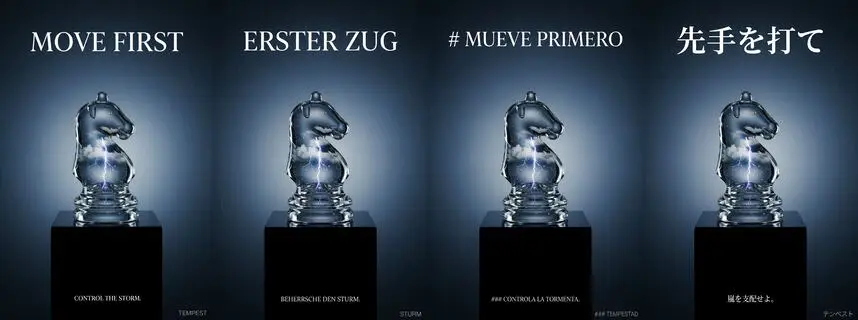
AppsTurn one hero ad into every market and format
Turns one hero ad into every market and format, with the headline translated in the image and a voiced tagline per language.