

How to build a generative media integration with your coding agent

Key Takeaways
- A coding agent can build a generative media integration end to end, from picking the model to shipping the feature, without the developer leaving the editor.
- Runway Dev is built for that: documentation an agent can read as raw Markdown, and Runway Dev MCP so the agent can act on the account instead of describing what it would do.
Developers want to centralize everything in their coding agent
More of the work now happens by directing a coding agent than by typing code. The developer describes what the product should do, the agent reads the codebase and writes it, and the developer reviews the result. That loop holds only while everything the agent needs is within its reach.
When it is not, the roles invert. The developer opens the console to create a key or set something up, the dashboard to check a balance, the task list to find out why a request failed, and then carries each answer back and pastes it into the session. The developer stops directing the agent and starts running errands for it.
There is a second cost, and it shows up in what gets built rather than in how long it takes. An agent arrives with an assumption about what an API integration looks like, and reads the documentation to execute that assumption rather than to question it. So it calls a model directly, and wires a chain together itself when the feature takes several steps. It never weighs the alternatives, because it has no reason to think there are any. The integration works, so nothing looks wrong. What is missed is the better version that was available the whole time.
Runway Dev is built so a coding agent can do the whole job without handing work back
Runway Dev’s documentation is written to be navigated by an agent. Every page is available as raw Markdown by appending .md to its path, an llms.txt index maps the whole API surface, and a condensed ai-context brief is the entry point. An agent reaches the right page faster and reads it more accurately, instead of parsing a rendered page and inferring the rest.
Runway Dev MCP connects a coding agent to a Runway Dev account, so it works from live information rather than a snapshot. It reads the projects on that account, the models each one can call with their current prices, capabilities and input limits, the credit balance before anything spends, the model router configurations that already exist, and the record behind any task.
With Runway Dev MCP connected, the agent builds the most efficient integration available to it, rather than the most obvious one. It can see the tools Runway Dev offers beyond the models and what each one is for, so it chooses between them instead of defaulting to a direct call. A use case Runway has already built and tuned becomes a Recipe call rather than a chain the agent assembles itself. A product that has to balance price, latency or quality gets a Model Router rather than a model ID, so the selected model is always the right one.
Debugging a failed generation usually means leaving the editor: someone has to look the task up, find the cause, and carry the answer back into the session. With the MCP the agent handles it without being asked. It looks the task up itself, gets the actual reason, whether that is a moderation rejection, an asset over a size limit or a malformed request body, and fixes that rather than guessing.
While most platforms expose models, Runway Dev gives the agent the tools Runway built to optimize model selection, prompting and chaining, so every integration is the best it could be.
Runway Dev MCP is separate from the Runway Media MCP at
mcp.runwayml.com, which generates media inside a chat rather than building an integration.
Get started with your coding agent on Runway Dev
Step 1: Connect the agent with the Runway Dev MCP
Recommended: start from Quickstart. Open Quickstart in Runway Dev and pick your coding agent. The button opens a new session in that agent carrying a prompt that points at Runway Dev’s setup brief, and the agent works from there: it inspects your project, reads the documentation, installs the Runway Dev skills where the agent supports them, and connects the Runway Dev MCP for live account access. You approve the sign-in in your browser when it asks.
The buttons hand off to each agent’s desktop app. If you work in the terminal, use Copy prompt and paste it into your agent instead.
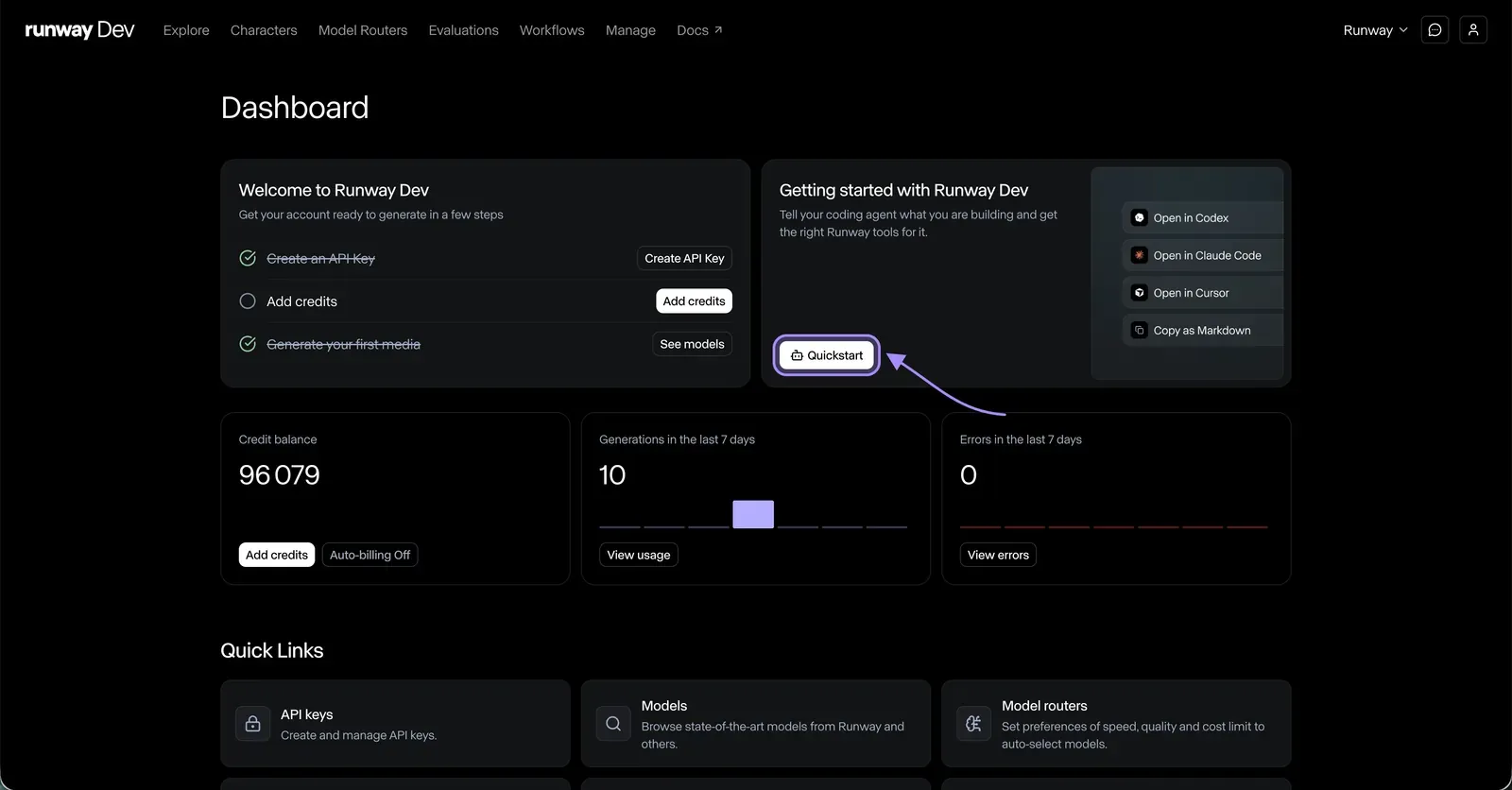
Or configure the client yourself. The server URL is https://dev.runwayml.com/mcp, and it is the same in every client.
Claude Code
claude mcp add --transport http --scope user runway-dev-mcp https://dev.runwayml.com/mcpThen run /mcp in a session and authenticate. Claude Code 2.1.186 and newer also supports claude mcp login runway-dev-mcp, with --no-browser from 2.1.191 for remote machines. Full walkthrough: How to build a generative media integration with Claude Code.
Claude Desktop
Add https://dev.runwayml.com/mcp as a custom connector, the same mechanism as Claude.ai.
Codex
codex mcp add runway-dev-mcp --url https://dev.runwayml.com/mcp
codex mcp login runway-dev-mcp --scopes openid,profile,email,mcp:read,mcp:write
Codex has a known scope-discovery issue, so the scopes are requested explicitly. If it connects but reports a missing mcp:read scope, log out and log in again with the same command. Full walkthrough: How to build a generative media integration with Codex.
Cursor
{ "mcpServers": { "Runway Dev": { "url": "https://dev.runwayml.com/mcp" } } }Paste into ~/.cursor/mcp.json for every project or .cursor/mcp.json for one, restart, then connect under Settings, MCP. Full walkthrough: How to build a generative media integration with Cursor.
Any other compatible client
Add it as a remote MCP server and sign in when the browser opens. Any client that supports remote MCP servers connects the same way.
Whichever route you took, confirm the connection. Ask the agent who you are and how many credits you have. It should return your Runway Dev email and your current balance.
Authentication happens in the browser, so no API key goes into a config file. Keys stay in your account, where you can rotate them.
Step 2: Add your API key to the project
The first time the agent is ready to run something, it asks for RUNWAYML_API_SECRET in the project environment. Create the key in your Runway Dev account and add it to the project’s environment file yourself. Do not paste it into the chat and do not let it end up hardcoded: the agent reads it from the environment.
Step 3: Describe what you are building
The agent has the catalog, your account and the documentation, so it does not need to be told which endpoint to use. It needs to know what you are building. If the workspace is empty it scaffolds one first and will recommend a web app as the starting point. If you already have an app, it integrates into that.
- Say what someone using your product or project should be able to do.
- Name what you already have as input: a product photo, a script, a catalog feed.
- Name what you need out: duration, resolution, format, whether it needs audio.
- Say where it runs: a route in your web app, a background job, a nightly batch.
- Give your constraints: a ceiling per generation, how long a user will wait, the quality bar you are holding.
- Ask it to explain which Runway Dev surface it plans to use, and why, before it writes any code.
Runway Dev offers more than a generation endpoint, and the right surface depends on the job:
- A Model Router, when you want the best model for each request without evaluating models yourself. You set the priority between cost, latency and quality, choose which models it may use, and cap what a single generation may spend. Your code passes a config ID instead of a model name, every response reports which model ran and what it cost, and new models can become eligible without a code change.
- A Recipe, when Runway has already built and tuned the use case. One call returns a production-ready asset, with the model selection, prompting and chaining already done, instead of a chain you assemble and then maintain. A Recipe can be pinned to a dated version, or set to track improvements as better models ship.
- A custom Workflow, when the pipeline is specific to you and takes several steps. It is built visually in the Runway Creative App, with no code, then published as an endpoint your integration calls once, however many steps it contains. Updating the workflow does not change the endpoint.
- A model called directly, when you already know which one you want.
You are now ready to let your agent handle media generation with Runway Dev autonomously, end to end.
Connect Runway Dev MCP from Quickstart and describe your first feature. Create an account to start building.
FAQ
Can a coding agent build a generative media integration?
Yes. A coding agent can add video, image or audio generation to an existing app end to end: choosing the surface and the model, writing the integration into your codebase, and reading back what happened when a generation fails. Connecting it to Runway Dev MCP is what gives it the live account and catalog information to do that without handing work back to you.
What models can the agent call through the Runway Dev API?
The best models from Runway and from other frontier labs, across:
- Video generation, including Gen-4, Veo 3.1, Seedance 2.5 and Wan 3
- Image generation and editing
- Audio generation
- Real-time conversational video agents, through Characters
- Upscaling
- HDR output
The catalog changes month to month, so the current list with prices and input limits lives in the models documentation. A connected coding agent reads it directly rather than working from a list it remembers.
How do I add video generation to my app with a coding agent?
Connect the agent to Runway Dev over MCP, then describe the feature: what someone using your product should be able to do, what you have as input, and what you need out. The agent picks a video model against the current catalog, Gen-4, Veo 3.1, Seedance 2.5 and Wan 3 among them, and writes the integration into your codebase. Inputs can be text or an image, and the duration, resolution and whether audio arrives with the output depend on the model.
How do I add image generation to my app with a coding agent?
The same three steps as video: connect the agent over MCP, add RUNWAYML_API_SECRET to the project environment, then describe the feature. Image requests take text and reference images rather than a duration, and Runway Dev covers editing as well as generation.
How do I add audio generation to my app with a coding agent?
Connect the agent over MCP and describe what the audio is for. Audio has its own routed endpoint, POST /v1/generate/audio, so a Model Router configured for audio works the same way as one for video or image: your code passes a config ID instead of a model name.
Can I upscale video or images through the Runway Dev API?
Yes. Upscaling is available alongside generation, so a coding agent can add an upscale step inside the integration rather than sending output to a separate tool.
Can I add a real-time AI avatar to my product?
Yes, through Characters. A Character is a real-time conversational video agent with knowledge documents attached to it, and a connected coding agent can create and manage Characters as well as call them.
Can I generate HDR video through the Runway Dev API?
Yes. HDR output is available alongside standard video generation, which matters when the result has to survive a color grade or meet a broadcast deliverable.
Do I need the MCP to use the video generation API?
No. The API works without it, and you can build an integration by hand from the documentation. Runway Dev MCP is what lets a coding agent read your account and the live catalog while it builds, so it chooses against current information instead of guessing.
What is an MCP server?
An MCP server is a service a coding agent connects to in order to read information and take actions outside its own context. Runway Dev MCP is one, hosted at https://dev.runwayml.com/mcp, and it gives a coding agent access to a Runway Dev account.
How do I connect Claude Code to Runway Dev?
Run claude mcp add --transport http --scope user runway-dev-mcp https://dev.runwayml.com/mcp, then run /mcp in a session and authenticate. Claude Code 2.1.186 and newer also supports claude mcp login runway-dev-mcp, and 2.1.191 adds --no-browser for remote machines.
How do I add Runway Dev MCP to Cursor?
Add {"mcpServers": {"Runway Dev": {"url": "https://dev.runwayml.com/mcp"}}} to ~/.cursor/mcp.json for every project, or .cursor/mcp.json for a single project, restart Cursor, then connect under Settings, MCP.
How do I connect Codex to Runway Dev?
Run codex mcp add runway-dev-mcp --url https://dev.runwayml.com/mcp, then codex mcp login runway-dev-mcp --scopes openid,profile,email,mcp:read,mcp:write. The scopes are requested explicitly because Codex has a known scope-discovery issue.
Why does Codex report a missing mcp:read scope?
Codex can connect without the scopes it needs, because of a known scope-discovery issue. Run codex mcp logout runway-dev-mcp, then log in again with codex mcp login runway-dev-mcp --scopes openid,profile,email,mcp:read,mcp:write to replace the cached authorization.
How do I add Runway Dev to Claude Desktop?
Add https://dev.runwayml.com/mcp as a custom connector, the same mechanism Claude.ai uses. Claude Code does not use Claude Desktop connectors, so it needs the terminal command instead.
Does Runway Dev MCP work with other coding agents?
Yes. It is a standard remote MCP server, so any client that supports remote MCP servers connects to https://dev.runwayml.com/mcp and signs in through the browser. Setup is documented for Claude Code, Claude Desktop, Codex and Cursor.
Why does the Open in Claude Code button in Quickstart not do anything?
The Quickstart buttons are app deep links, so they hand off to each agent’s desktop app. If you work in the terminal, use Copy prompt in Quickstart and paste the prompt into your agent instead.
What is Runway Dev MCP?
A hosted MCP server at https://dev.runwayml.com/mcp that connects a coding agent to a Runway Dev account, so it can read live platform information and the account’s own projects, configurations and tasks while it builds the integration.
How do I set up Runway Dev MCP?
Open Quickstart in Runway Dev, choose your coding agent, and follow the steps. To configure a client by hand, point it at https://dev.runwayml.com/mcp and complete OAuth in the browser.
Is Runway Dev’s documentation readable by an agent?
Yes. Every page is available as raw Markdown by appending .md to its path, and an llms.txt index covers authentication, the task lifecycle, per-model request fields and the OpenAPI spec, with a condensed ai-context brief as the entry point.
What should I ask the agent to build first?
Describe the feature the way you would write a ticket: what someone using your product should be able to do, what you have as input, what you need as output, where it runs, and your constraints on cost, latency and quality. Ask it to explain which Runway Dev surface it plans to use before it writes any code.
Do I put my API key in the MCP config?
No. Runway Dev MCP uses OAuth, so no key belongs in mcp.json or any other client config. Keys stay in the Runway Dev account, where they can be rotated.
How do I know the connection worked?
Ask the agent who you are and how many credits you have. It returns the email on the Runway Dev account and the current credit balance.
Should I let the agent complete the sign-in?
No. Complete OAuth yourself in your normal browser. Do not ask an agent to automate sign-in or approval steps.
What is the difference between Runway Dev MCP and Runway Media MCP?
Runway Dev MCP, at dev.runwayml.com/mcp, connects a coding agent to a Runway Dev account so it can plan, configure and debug an integration. Runway Media MCP, at mcp.runwayml.com, generates media inside a chat. It does not build integrations.
What is the difference between an agent reading the docs and an agent connected to Runway Dev?
An agent reading documentation can write code. An agent connected over MCP can also see which models the project can call today with their prices and inputs, create a Model Router, estimate a generation’s cost before running it, and read the recorded reason a task failed.
Do I still need a Runway API key?
Yes, for live generation calls from your app. The agent asks for RUNWAYML_API_SECRET in the project environment the first time it is ready to run something. Add it yourself rather than pasting it into the chat, and keep it out of the code.
Does Runway Dev have skills for coding agents?
Yes. Quickstart installs a shared Runway Dev skill plus a surface skill where your agent supports them, using npx skills add runwayml/skills. The surface skills cover models, model routers, characters and recipes.
When should the agent use a Model Router instead of naming a model?
When you want the best model for each request without evaluating models yourself. You set the priority between cost, latency and quality, choose which models are eligible, and cap what a single generation may spend, and the code passes a config ID instead of a model name.
When should the agent use a Recipe?
When Runway has already built and tuned the use case. One call returns a production-ready asset with the model selection, prompting and chaining already done, instead of a chain you assemble and then maintain.
When should the agent use a custom Workflow?
When the pipeline is specific to you and takes several steps. A Workflow is built visually in the Runway Creative App, then published as an endpoint your integration calls once, however many steps it contains.
Can the agent spend my credits without asking?
No. Runway Dev’s setup brief tells the agent to treat a billable test call as optional unless you asked for one, and to ask before creating or changing anything live in the account.
Can the agent change my Runway Dev account?
It can create and manage configurations such as Model Routers and Characters, and it is instructed to ask before creating or changing live account state. You complete the OAuth sign-in yourself, and API keys stay in your account rather than in any client config.
Is Runway Dev ready for production use?
Runway Dev runs with SOC 2 Type II compliance, built-in content moderation and 99.9% uptime. IP indemnification is available under a Runway Dev Enterprise agreement for covered claims that its services infringe a third party’s intellectual property rights, subject to the exclusions and conditions in the Enterprise Services Terms.
Start building on Runway Dev
Related articles
 Tutorials
How to build a generative media integration with Claude Code
Connect Claude Code to Runway Dev MCP and let it build, debug and maintain a video, image or audio generation integration.
 Tutorials
How to build a generative media integration with Codex
Connect Codex to Runway Dev MCP and let it build, debug and maintain a video, image or audio generation integration.
 Tutorials
How to build a generative media integration with Cursor
Connect Cursor to Runway Dev MCP and let it build, debug and maintain a video, image or audio generation integration.