

How to build a generative media integration with Claude Code

Claude Code can build, debug and maintain a video, image, audio or real-time avatar generation API integration autonomously, end to end. Connecting it to Runway Dev MCP is what makes that possible: the agent works from your Runway Dev account and the live model catalog rather than from documentation alone, so it picks models against current prices and input limits, configures whatever the integration needs, and reads back the actual cause when a generation fails. This walks through the setup and the first build, from the terminal command to a working feature in your app.
Step 1: Add Runway Dev MCP to Claude Code
| Desktop app | Terminal | |
|---|---|---|
| Connect | Quickstart, then Open in Claude Code | claude mcp add --transport http --scope user |
| Authenticate | Approve in the browser when asked | /mcp in a session, or claude mcp login on 2.1.186 and newer |
| Remote machine or SSH | Not applicable | claude mcp login --no-browser on 2.1.191 and newer |
| Skills | Installed for you | npx skills add runwayml/skills --skill runway-dev --skill runway-dev-models --agent claude-code -y |
If you’re using Claude Code from the desktop app: start from Quickstart
Open Quickstart in Runway Dev and click Open in Claude Code. It opens a new session carrying a prompt that points at Runway Dev’s setup brief, and the agent works from there: it inspects your project, reads the documentation, installs the Runway Dev skills where they are supported, and connects the Runway Dev MCP. Approve the sign-in in your browser when it asks.
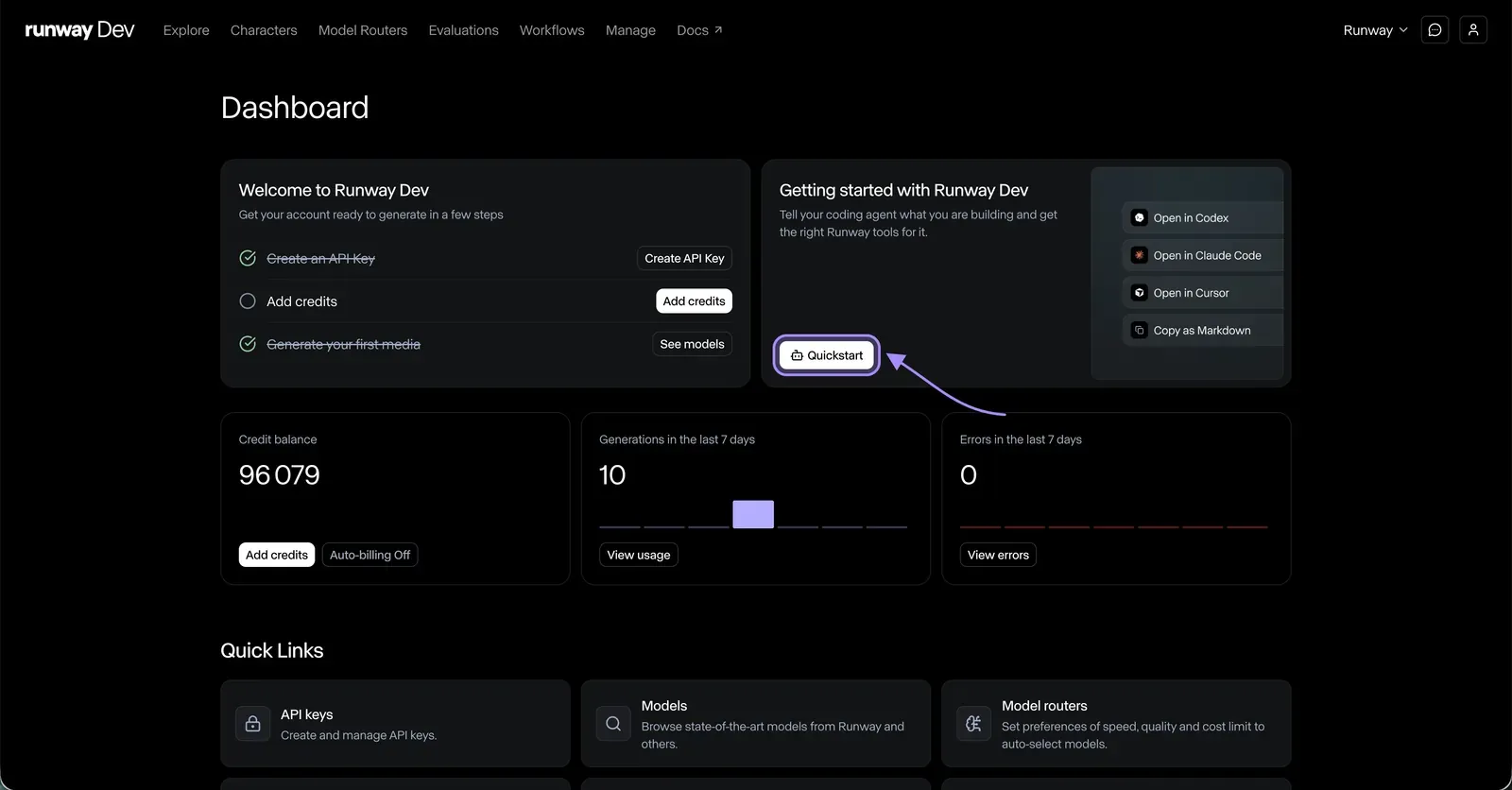
That button is an app deep link, so it only works if you have the desktop app. From the terminal, use the route below.
If you’re using Claude Code from the terminal: add the server yourself
claude mcp add --transport http --scope user runway-dev-mcp https://dev.runwayml.com/mcp--scope user makes the server available in every project. Use --scope project instead if you only want it in the current one.
Then authenticate. Run /mcp inside a session, select runway-dev-mcp, and complete the sign-in in your browser. No API key goes into any config file: the connection is OAuth, and your keys stay in your Runway Dev account.
On Claude Code 2.1.186 and newer you can start authentication from the terminal instead:
claude mcp login runway-dev-mcpOn 2.1.191 and newer, add --no-browser to print an authorization URL rather than opening a local browser, which is what you want on a remote machine or over SSH. Both version thresholds are documented in the Runway Dev MCP setup guide:
claude mcp login runway-dev-mcp --no-browserIf Claude Code shows “Needs authentication”: run /mcp, select runway-dev-mcp, complete the sign-in in your normal browser, then retry the tool in the same session. Only start a new session if the authenticated tools are still unavailable.
Complete the sign-in yourself rather than asking Claude Code to automate it.
Confirm it worked. Ask who you are and how many credits you have. It should return the email on your Runway Dev account and your current balance.
Step 2: Install the Runway Dev skills (optional)
Skip this if you started from Quickstart. The agent installs them for you.
Otherwise, Runway publishes agent skills that teach Claude Code how each surface works before it writes anything:
npx skills add runwayml/skills --skill runway-dev --skill runway-dev-models --agent claude-code -ySwap the surface skill for the one that matches the job: runway-dev-models, runway-dev-model-routers, runway-dev-characters or runway-dev-recipes. The shared runway-dev skill comes along either way.
Skipping it altogether is fine too. Claude Code then works from the documentation, which it can read as raw Markdown by appending .md to any docs path.
Step 3: Add your API key to the project
The MCP connection is OAuth, but a live generation call still needs a key of its own. The first time Claude Code is ready to run something, it asks for RUNWAYML_API_SECRET in the project environment.
Create the key in your Runway Dev account and add it to the project’s environment file yourself. Do not paste it into the session, and do not let it end up hardcoded: Claude Code reads it from the environment.
Step 4: Describe what you are building
Claude Code now has your codebase, your account and the live catalog, so it does not need to be told which endpoint to call. It needs to know what you are building.
- Say what someone using your product should be able to do.
- Name what you already have as input: a product photo for image to video, a script for text to video, a catalog feed.
- Name what you need out: duration, resolution, format, whether it needs audio.
- Say where it runs: a route in your web app, a background job, a nightly batch.
- Give your constraints: a ceiling per generation, how long a user will wait, the quality bar you are holding.
- Ask it to explain which Runway Dev surface it plans to use, and why, before it writes any code.
Runway Dev offers more than a generation endpoint, and the right surface depends on the job:
- A Model Router, when you want the best model for each request without evaluating models yourself. Your code passes a config ID instead of a model name, and Claude Code can create the router and rewrite the calling code in the same turn.
- A Recipe, when Runway has already built and tuned the use case. One call returns a production-ready asset, with the model selection, prompting and chaining already done.
- A custom Workflow, when the pipeline is specific to you and takes several steps. It is built visually in the Runway Creative App, then published as an endpoint your integration calls once.
- A model called directly, when you already know which one you want.
When a generation fails, Claude Code looks the task up itself and reads the actual cause, whether that is a moderation rejection, an asset over a size limit or a malformed request body, rather than working backwards from a status code.
You are now ready to let Claude Code handle media generation with Runway Dev autonomously, end to end.
Connect Runway Dev MCP from Quickstart and describe your first feature. Create an account to start building.
FAQ
How do I connect Claude Code to Runway Dev?
Run claude mcp add --transport http --scope user runway-dev-mcp https://dev.runwayml.com/mcp, then run /mcp in a session, select runway-dev-mcp and authenticate in your browser.
How do I connect Runway Dev to Claude Code in the desktop app?
Open Quickstart in Runway Dev and click Open in Claude Code. It opens a new session with a prompt pointing at Runway Dev’s setup brief, and the agent handles the setup from there, including connecting the MCP. Approve the sign-in in your browser when it asks.
Does Claude Code use the same setup as Claude Desktop?
No. Claude Code does not use Claude Desktop connectors. Claude Desktop adds https://dev.runwayml.com/mcp as a custom connector, while Claude Code adds the server from a terminal.
Can I log in to Runway Dev MCP from the Claude Code terminal?
Yes, on Claude Code 2.1.186 and newer, with claude mcp login runway-dev-mcp. Version 2.1.191 adds --no-browser, which prints an authorization URL instead of opening a local browser.
How do I connect Runway Dev MCP over SSH or on a remote machine?
Use claude mcp login runway-dev-mcp --no-browser on Claude Code 2.1.191 or newer. It prints an authorization URL you can open on whichever machine has a browser.
Why does Claude Code say “Needs authentication” for runway-dev-mcp?
The server is added but the OAuth sign-in has not completed. Run /mcp, select runway-dev-mcp, finish the sign-in in your normal browser, then retry the tool in the same session. Start a new session only if the authenticated tools are still unavailable.
Should I add the server with --scope user or --scope project?
Use --scope user to make Runway Dev available in every project on that machine, and --scope project to limit it to the current one.
Do I put my Runway API key in the Claude Code MCP config?
No. The connection uses OAuth in the browser, so no key belongs in any MCP config. Keys stay in your Runway Dev account, where you can rotate them.
Do I still need a Runway API key with Claude Code?
Yes, for live generation calls from your app. Claude Code asks for RUNWAYML_API_SECRET in the project environment the first time it is ready to run something. Add it yourself rather than pasting it into the session.
How do I know Claude Code is connected to Runway Dev?
Ask who you are and how many credits you have. It returns the email on your Runway Dev account and your current credit balance.
Does the Open in Claude Code button in Quickstart work from the terminal?
No. The Quickstart buttons are app deep links, so they hand off to the desktop app. If you work in the terminal, use Copy prompt in Quickstart and paste the prompt into Claude Code instead.
Are there Runway Dev skills for Claude Code?
Yes. Install them with npx skills add runwayml/skills --skill runway-dev --skill <surface-skill> --agent claude-code -y. The surface skills cover models, model routers, characters and recipes.
Can Claude Code create a Model Router for me?
Yes. Ask for a router with the settings you want and for the integration to be updated to use it. It creates the configuration, reads it back, and rewrites the calling code to pass the config ID.
Can Claude Code spend my credits without asking?
No. Runway Dev’s setup brief tells the agent to treat a billable test call as optional unless you asked for one, and to ask before creating or changing anything live in the account.
How does Claude Code debug a failed generation?
It looks the task up through the MCP and reads the recorded cause, such as a moderation rejection, an asset over a size limit or a malformed request body, instead of guessing from the error string.
What can I build with Claude Code and Runway Dev?
Video, image and audio generation, real-time conversational video agents through Characters, upscaling and HDR output, using models from Runway and from other frontier labs.
Start building on Runway Dev
Related articles
 Tutorials
How to build a generative media integration with your coding agent
Let a coding agent build a video, image or audio generation integration end to end, with Runway Dev MCP giving it live account access.
 Tutorials
How to build a generative media integration with Codex
Connect Codex to Runway Dev MCP and let it build, debug and maintain a video, image or audio generation integration.
 Tutorials
How to build a generative media integration with Cursor
Connect Cursor to Runway Dev MCP and let it build, debug and maintain a video, image or audio generation integration.