

What is HDR video, and when does your product need it?

Key Takeaways
- HDR video is a wider brightness range carried by three signal properties that travel together: 10-bit or higher precision, BT.2020 color primaries, and a PQ or HLG transfer function.
- Most video generation APIs return an 8-bit H.264 MP4, which cannot carry HDR and offers no alternative. A small number of models generate HDR natively; everything else reaches HDR through a conversion step.
- Deliver HDR when the output reaches a display that renders it, or continues into an edit or a composite. Keep every other surface on SDR.
- The export format depends on what happens to the file next, and on the recipient’s delivery spec. HEVC in HDR10 or HLG is what reaches a viewer’s screen. ProRes and OpenEXR carry the range into editing, grading, and compositing.
- Runway Dev covers both paths, to a maximum of 16 bits. Gen-4.5 generates natively in HDR. Runway Ruby converts to HDR any SDR clip up to 30 seconds.
What is covered
Five sections:
- What is HDR video?
- Why does HDR matter?
- When should your product deliver HDR?
- Which HDR format should you export?
- HDR on Runway Dev
1. What is HDR video?
HDR video is a wider range of brightness than SDR, encoded so that a display can reproduce it. Brightness is measured in nits, or candelas per square meter. SDR is mastered against a reference white of about 100 nits, while HDR is mastered against 1,000 and above, with the standard allowing up to 10,000.
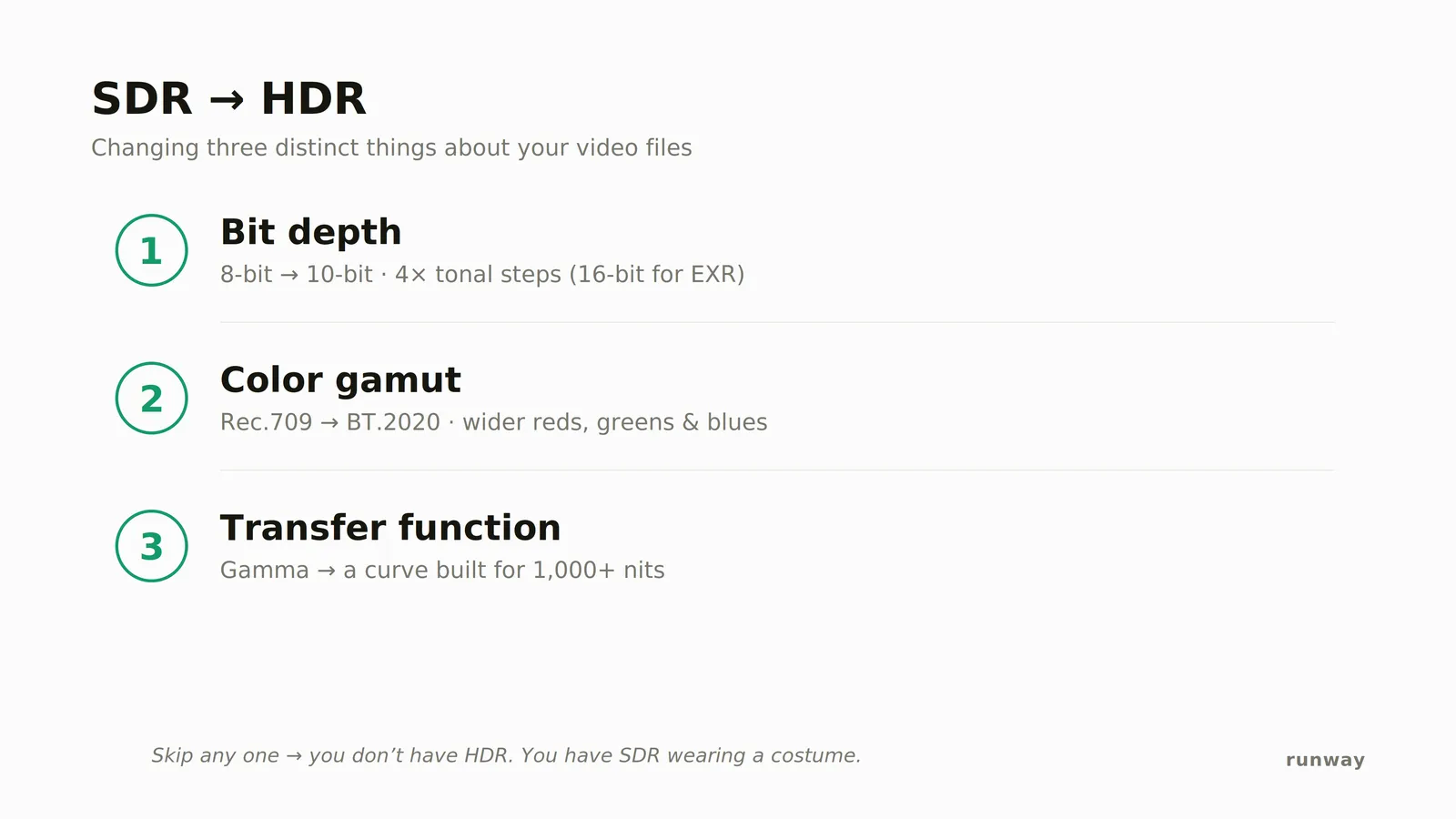
Three things in the file have to be right: 10-bit or higher precision, BT.2020 color primaries, and a PQ or HLG transfer function. A file missing any one of them is not HDR.
| Property | SDR | HDR |
|---|---|---|
| Reference white | About 100 nits | 1,000 nits and above, up to 10,000 |
| Bit depth | 8-bit, 256 steps per channel | 10-bit minimum, 12-bit for mastering |
| Color primaries | Rec. 709 | BT.2020 |
| Transfer function | Conventional gamma | PQ or HLG |
| Mastering metadata | None | ST 2086, MaxCLL and MaxFALL on PQ |
1.1 Bit depth carries the range without banding
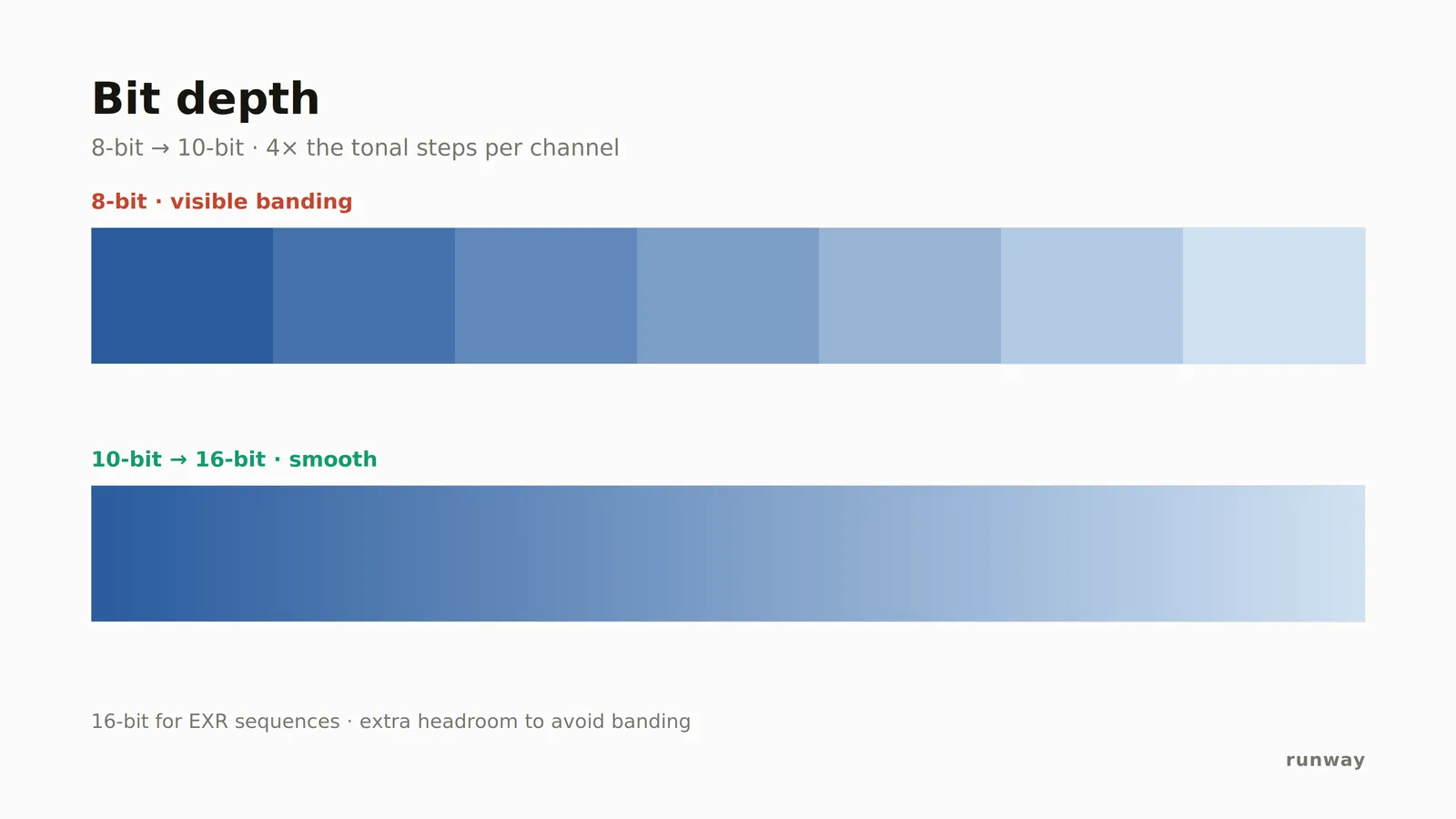
Bit depth is the number of steps available between black and peak white. 8-bit gives 256 steps per channel, 10-bit gives 1,024, and 12-bit gives 4,096. Stretching 256 steps across an HDR brightness range puts visible bands in gradients and soft falloff. ITU-R Rec. 2100, the international standard for HDR video, sets 10-bit as the floor, and every HDR delivery format inherits it. OpenEXR sequences sit outside that ladder, using 16-bit floating point rather than integers.
1.2 BT.2020 sets the colors, not the brightness
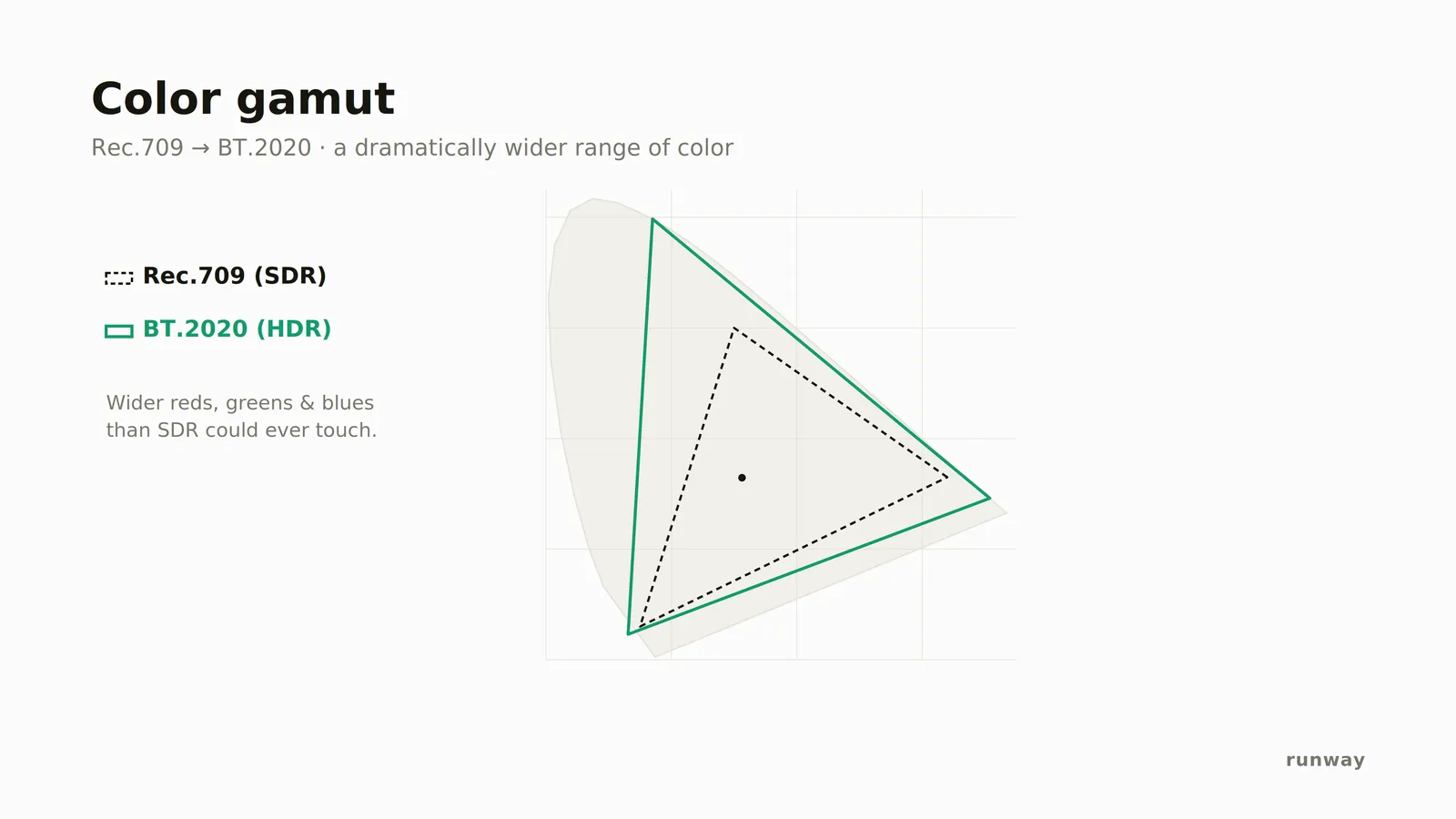
BT.2020 is a color space. It defines the red, green, and blue primaries that bound the colors a file can express. BT.2020’s primaries are single wavelengths of light, which makes its gamut far wider than Rec. 709, the color space SDR video uses.
In practice, almost all HDR is graded inside P3-D65, the narrower gamut that cinema projectors and good consumer displays actually reach, then carried in the BT.2020 container. No display reaches the full BT.2020 primaries.
1.3 The transfer function decides how code values become light
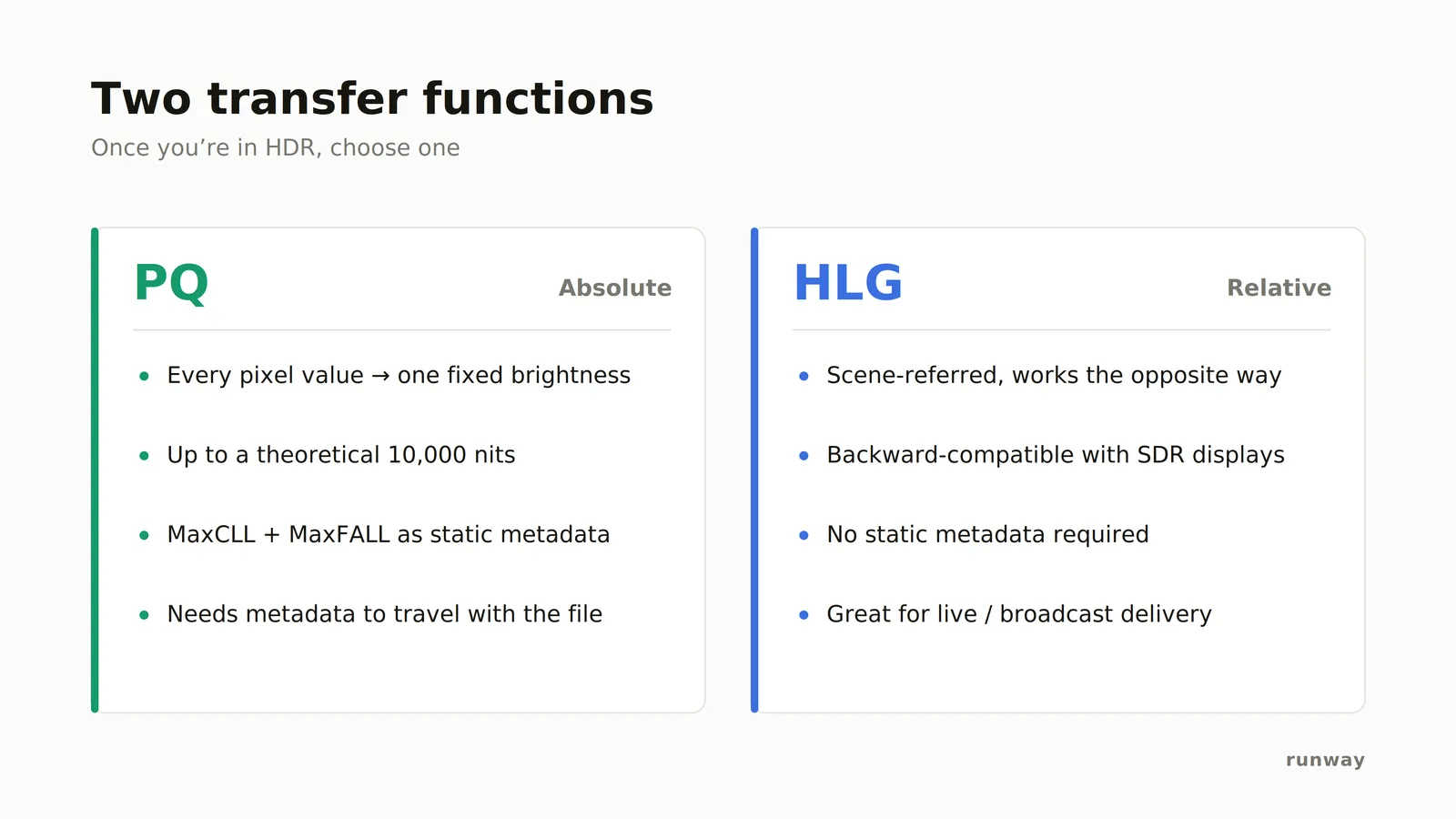
The transfer function maps stored numbers to brightness on screen. HDR has two, and choosing between them comes down to whether you know what display the file will land on.
PQ, the Perceptual Quantizer, is absolute. A code value means a specific number of nits, and a display that cannot reach those levels reads the file’s mastering metadata to tone map, so that metadata has to survive every encode downstream. PQ is the curve inside HDR10, and the choice for streaming and mastering, where the delivery target is known.
HLG, Hybrid Log-Gamma, is relative and scene-referred. The same file shows a usable picture on an SDR display, and it carries no metadata for a later encode to drop. That makes HLG the choice for broadcast, live, and any audience whose screens you do not control.
2. Why does HDR matter?
2.1 HDR holds highlights that SDR clips
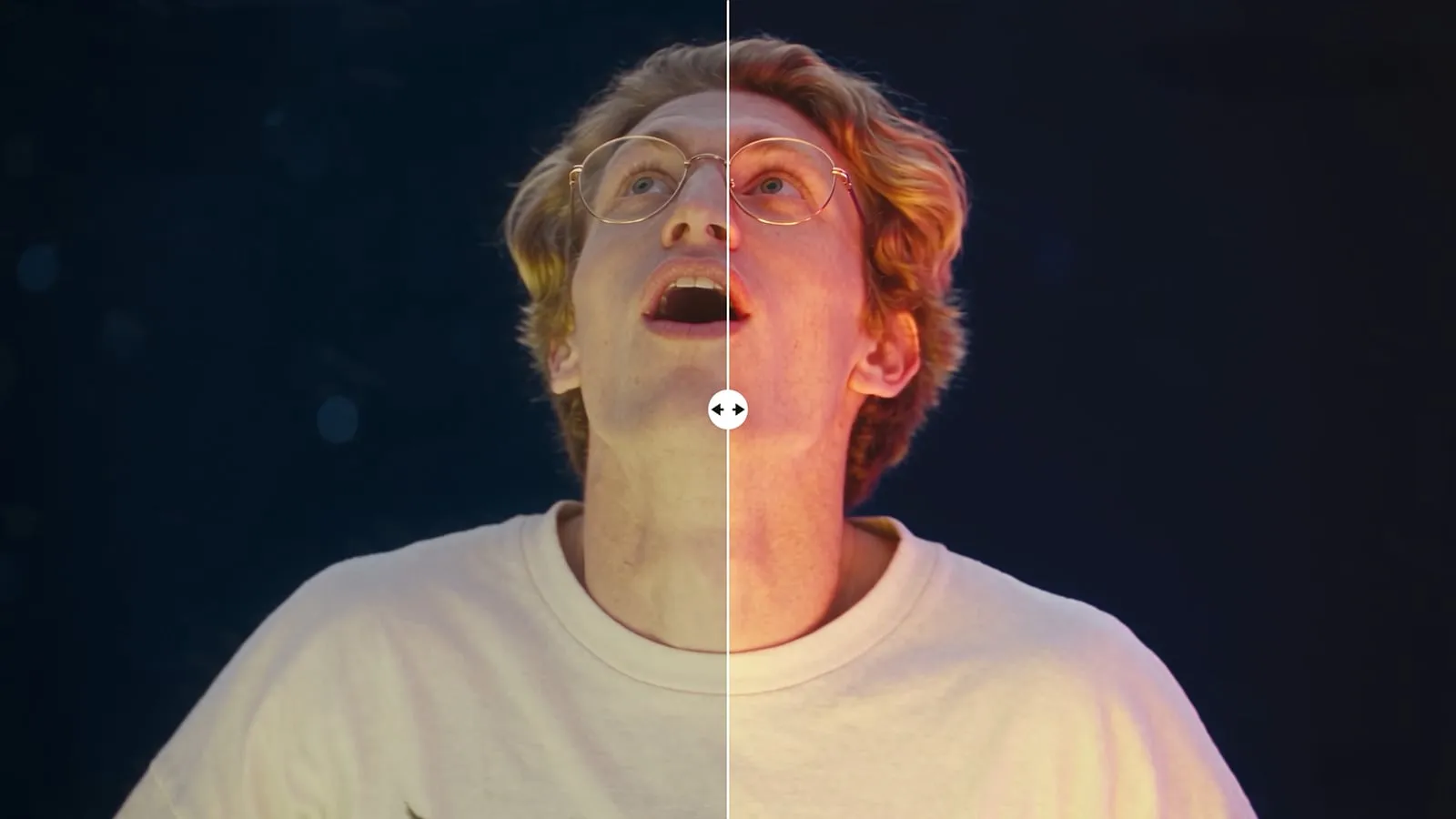
HDR holds detail in the brightest parts of an image, where SDR clips everything above its reference white to a single flat value. The difference shows in whatever carries real intensity in a shot: skies, windows, screens, reflections, neon, and fire. In SDR they flatten into white patches. In HDR they keep their shape and their color.
2.2 HDR leaves room to grade and composite
HDR guarantees the bit depth a grade needs. A 10-bit file has at least four times as many steps to redistribute as an 8-bit one, so shadows lift and highlights pull without the gradient breaking into bands.
HDR is essential for compositing, because a composite is built in a scene-linear space where values above diffuse white, the level a plain white surface sits at in the scene, still exist as numbers. That range is what lets a generated element be relit, exposure-matched, and graded to sit inside a rendered or filmed plate. A display-encoded 8-bit file has already clipped those values away.
2.3 HDR is what current devices record and what delivery specs expect
HDR is already the default on the devices an audience owns. iPhones have recorded HDR video by default since the iPhone 12 in 2020, and recent Android flagships do the same. Modern phone and laptop displays reach 1,000 nits or more of peak brightness. Streaming delivery specifications commonly require an HDR master, and an 8-bit file fails QC against them.
2.4 SDR content looks cheap beside HDR content
SDR video is judged against whatever sits beside it. A clip appears in a feed, a carousel, an ad break, or a page, never on its own, and what appears beside it is increasingly HDR: footage from the viewer’s own phone, a streaming trailer, someone else’s ad. An SDR clip in that company reads as dimmer and flatter than everything around it, which is a harsher test than being judged on its own merits.
3. When should your product deliver HDR?
HDR earns its cost when the output reaches a display that renders it, or continues into work that needs the range. Everywhere else HDR is a liability, because an HDR file sent through an SDR path looks worse than an SDR file would.
3.1 Deliver HDR when the output is the final thing a viewer watches
- Streaming and video on demand, where HDR10 or Dolby Vision is the expected master.
- Social video, where YouTube and Meta ingest HDR and build their own SDR renditions. Support is less consistent elsewhere, so check the platform before committing.
- Connected TV and out-of-home, where the panel is large, bright, and color managed.
- In-app playback, when the player is under your control and the device reports HDR support.
- Broadcast and live, where HLG is the delivery format.
3.2 Deliver HDR when the footage continues into an edit or a composite
- Grading and color finishing.
- VFX and compositing, where generated elements sit alongside rendered or filmed plates.
- Virtual production, where content is played back on an LED wall with a much wider range than a monitor.
- Archival masters, where the goal is to keep the range now and derive smaller versions later.
3.3 Stay in SDR for previews, thumbnails, and anything re-encoded downstream
An HDR file that passes through an encoder without tone mapping comes out desaturated and wrongly exposed, because the encoder reads PQ-encoded BT.2020 values as if they were Rec. 709. Browser preview players, thumbnail extraction, moderation pipelines, most internal tooling, and platforms that only ingest H.264 are all SDR paths. Generate or transcode an SDR version for them rather than sending the HDR master through and hoping.
3.4 One HDR master plus a separate SDR pass covers both
Platforms that accept HDR produce their own SDR downconversion automatically, and that conversion is generic. When highlight rendering matters, deliver an HDR master and a separately graded SDR version rather than letting the platform decide. Keeping both means every surface receives a file it can read, and no surface receives one it cannot.
4. Which HDR format should you export?
The export format is set by what happens to the file next, and often by a delivery spec the recipient has already published. Six formats cover almost every case.
| Format | What it contains | Typical use |
|---|---|---|
| HDR10 | HEVC Main 10, BT.2020 + PQ, 10-bit, static metadata | Streaming and in-app playback to a viewer |
| HLG | HEVC Main 10, BT.2020 + HLG, 10-bit, no per-title metadata | Broadcast, live, and viewers on unknown displays |
| ProRes | BT.2020 + PQ .mov, 10-bit at 422 and 422 HQ, 12-bit at 4444 | Editing and grading, and the master many delivery specs require |
| OpenEXR sequence | Half-float frames, linear BT.2020 light | Compositing, VFX, and any work in a scene-linear space |
| OpenEXR in ACEScg | Half-float frames, scene-referred ACEScg | The same work inside an ACES-managed pipeline |
| 10-bit Rec. 709 | HEVC Main 10, Rec. 709, SDR curve | An SDR pipeline that still needs grading headroom |
4.1 HDR10 and HLG are what reaches a viewer’s screen
HDR10 and HLG are compressed, viewer-facing, and 10-bit. Choose HDR10 when the destination is a streaming platform or a player that reads metadata. Choose HLG when the display is unknown or the chain is live, because an HLG file degrades to a watchable picture on an SDR screen instead of an unwatchable one.
4.2 ProRes serves as both an intermediate and a required deliverable
ProRes is the mezzanine, the intermediate file an edit and a grade are built on. It cuts natively alongside camera originals, and it is far larger than a compressed master and much cheaper to decode and scrub, which is why it sits in the middle of most post pipelines.
ProRes is also named outright in delivery specs. The AICP file deliverable specification for North America names ProRes 422 HQ, and broadcast and agency specs frequently do the same. Intermediate and deliverable are roles rather than formats, and one ProRes file often plays both.
The profile sets the bit depth: 422 and 422 HQ are 10-bit, and 4444 is 12-bit with an alpha channel. Read the recipient’s spec for the exact profile and wrapper before rendering, because delivering a lower tier than the spec names is a routine QC rejection.
4.3 EXR sequences are the compositing format
OpenEXR stores half-float values per channel with no display encoding, so brightness above diffuse white is preserved as numbers rather than clipped. That is what a compositor needs to relight an element, match exposure to a plate, or hold a highlight through a grade. EXR sequences arrive as a folder or an archive of frames rather than a single file, with audio carried separately.
ACEScg is the same container in a specific working space. If a facility runs an ACES-managed pipeline, EXR frames delivered as scene-referred ACEScg drop straight in without an input transform. Match the ACES version to the pipeline, 1.3 or 2.0, because they are not interchangeable.
4.4 A 10-bit Rec. 709 file adds grading headroom without HDR signaling
10-bit SDR keeps the Rec. 709 primaries and the SDR curve, so every existing tool reads it correctly, and adds the bit depth that stops banding under a grade. When the delivery surface is SDR but the footage still gets color work, 10-bit Rec. 709 is the right export. It removes the banding problem without introducing the signaling problems that HDR brings.
5. HDR on Runway Dev
Most video generation APIs return an H.264 MP4 at 8 bits per channel and offer no alternative, so the output is SDR whatever the model produced internally. A small number of models generate HDR natively. Everything else reaches HDR through a dedicated conversion step, and there is no third path further down the pipeline.
Runway Dev covers both. Gen-4.5 generates HDR from the start, and Runway Ruby converts video that is not.
5.1 Gen-4.5 generates natively in HDR
Gen-4.5 renders true HDR, graded into BT.2020 with measured HDR10 metadata rather than tone mapped up from an SDR render. Set outputFormat on the generation request. The HDR values are hdr10, hlg, hdr_pq_12bit_master, hdr_prores, hdr_png_sequence, hdr_exr_sequence, hdr_exr_acescg_sequence_1_3, and hdr_exr_acescg_sequence_2_0.
Gen-4.5 also delivers prores, png_sequence, and sdr_rec709_10bit, the 10-bit Rec. 709 master.
Nothing else about the request changes:
curl -X POST https://api.dev.runwayml.com/v1/text_to_video \
  -H "Authorization: Bearer $RUNWAYML_API_SECRET" \
  -H "X-Runway-Version: 2024-11-06" \
  -H "Content-Type: application/json" \
  -d '{
    "model": "gen4.5",
    "promptText": "a candlelit room at dusk",
    "ratio": "1280:720",
    "duration": 5,
    "outputFormat": "hdr10"
  }'
The call returns a task id. Poll GET /v1/tasks/{id} for the finished video, exactly as with any other generation.
5.2 Runway Ruby converts SDR video to HDR
Ruby is Runway’s own color grading model. It takes a finished SDR clip and redistributes its brightness and color into HDR, preserving the source pixels and the audio. Call it with POST /v1/video_to_hdr and model: ruby.
The input can be a Runway generation, the output of any third-party model in the catalog, or a file from an existing library. Sources already tagged as HDR are rejected, so the input has to be SDR. Clips run up to 30 seconds, at up to 4,096 pixels per side, and output dimensions may be cropped to a multiple of 16.
A converted clip is built for downstream color correction rather than as a finished grade. What it delivers is latitude, in blacks, shadows, and speculars, rather than an image that looks different straight out of the API, and it does not repair artifacts such as banding already present in the source.
5.3 Ruby output formats run from 10-bit HDR10 to 16-bit EXR
| outputFormat | Bit depth | What it is |
|---|---|---|
hdr10 (default) |
10-bit | HEVC Main 10, BT.2020 + PQ |
hlg |
10-bit | HEVC Main 10, BT.2020 + HLG |
hdr_prores, profile 422 or 422 HQ |
10-bit | BT.2020 + PQ ProRes .mov |
hdr_prores, profile 4444 |
12-bit | BT.2020 + PQ ProRes .mov |
hdr_exr_sequence |
16-bit | Half-float OpenEXR frames, linear BT.2020 light |
hdr_exr_acescg_sequence_1_3 and _2_0 |
16-bit | Half-float OpenEXR frames, scene-referred ACEScg |
EXR deliverables arrive as a ZIP containing the frames, colorimetry and provenance sidecars, and an audio.wav when the source has audio. ACEScg outputs are compatible with stock ACES - ACEScg input transforms, so they enter an ACES pipeline without an extra transform step.
5.4 HDR costs more per second on both paths
Generating in HDR with Gen-4.5. The model runs at 12 credits per second, and an HDR or 10-bit outputFormat adds 20 credits per second on top, rising to 40 when the output is larger than 4 megapixels. A 5 second 1080p clip is 60 credits as a standard mp4 and 160 credits in HDR10. ProRes and PNG sequences add 5 credits per second instead.
Converting with Ruby. Ruby costs 20 credits per second of video, and 40 credits per second when the source is larger than 4 megapixels. A 5 second conversion at 1080p is 100 credits.
Credits are $0.01 each, so the HDR generation above is $1.60 and the conversion is $1.00. The two routes to an HDR file cost the same end to end: generating 5 seconds in SDR and converting it comes to 160 credits, exactly what generating those 5 seconds natively in HDR costs.
5.5 Both paths run on every Runway Dev account
Generating HDR with Gen-4.5 and converting with Runway Ruby are both available on every Runway Dev account. Each is an ordinary API call billed per second of video, so the only requirements are an API key and credits.
5.6 HDR output cannot be judged in a browser
An HDR file can be correct and still look wrong in a browser player, or on any display that cannot show HDR. Download the asset and review it in a professional player on a display that supports HDR10 or HLG before deciding whether a generation or a conversion worked.
FAQ
What is HDR video?
HDR video is video with a wider range of brightness than SDR, encoded so a display can reproduce it. SDR is mastered against a reference white of about 100 nits, while HDR is mastered against 1,000 nits and above, with the standard allowing up to 10,000. HDR requires three things together: 10-bit or higher precision, BT.2020 color primaries, and a PQ or HLG transfer function.
What is the difference between HDR and SDR video?
SDR video uses Rec. 709 primaries, a conventional gamma curve, and typically 8 bits per channel, with a reference white around 100 nits. HDR video uses BT.2020 primaries, a PQ or HLG curve, and 10 or 12 bits per channel, with peak brightness an order of magnitude higher. The difference is in the signal description as much as in the pixels.
What is the difference between PQ and HLG?
PQ is absolute and HLG is relative. PQ, standardized as SMPTE ST 2084, assigns each code value a specific brightness in nits and expects the display to adapt. HLG, standardized as ARIB STD-B67, describes brightness relative to the display’s own range, and its lower half is ordinary gamma so an SDR screen shows a usable picture. PQ is used for streaming and mastering. HLG is used for broadcast, live, and any case where the viewer’s display is unknown.
Does HDR video require 10-bit?
HDR video requires 10 bits per channel as a minimum. Rec. 2100 mandates it, HDR10 and HDR10+ mandate it, and Dolby Vision runs at 10 or 12 bits. 8 bits gives 256 steps per channel, which produces visible banding when stretched across an HDR brightness range.
What is BT.2020, and is BT.2020 the same as HDR?
BT.2020 is a wide color space that defines the red, green, and blue primaries bounding the colors a file can express, using single wavelengths of light as its primaries. BT.2020 is not HDR. It describes color and not dynamic range, and its own transfer curve is the SDR gamma. HDR files use BT.2020 primaries together with a separate PQ or HLG curve.
Can 8-bit H.264 video carry HDR?
8-bit H.264 cannot carry HDR. The format has no way to signal an HDR transfer function or hold mastering metadata, so platforms and players treat the file as SDR. Re-encoding an 8-bit file into a 10-bit HEVC container changes the container without restoring range, because the values were already quantized and clipped.
Can AI video generation models output HDR?
Most AI video generation models output 8-bit SDR only, as an H.264 MP4 with no HDR option on the request. A small number generate HDR natively, and everything else reaches HDR through a separate SDR to HDR conversion. On Runway Dev, Gen-4.5 generates HDR natively at up to 16 bits, and Runway Ruby converts any SDR clip up to 30 seconds, including output from third-party models in the catalog.
Can SDR video be converted to HDR?
SDR video can be converted to HDR, in a process known as inverse tone mapping, and the conversion synthesizes range rather than recovering it. A conversion model redistributes the brightness present in the file into a wider container and infers what belongs in the new headroom. Highlights clipped before conversion were never recorded, so they are reconstructed. Cleaner sources produce more accurate conversions.
Which export format should be used for HDR video?
The export format depends on what happens to the file next, and on any delivery spec the recipient has published. HDR10 and HLG in HEVC are what reaches a viewer’s screen. ProRes carries HDR into an edit or a grade, at 10-bit in the 422 profiles and 12-bit at 4444, and ProRes 422 HQ is also the master many broadcast and advertising specs require. OpenEXR sequences carry HDR into compositing, in linear BT.2020 or in scene-referred ACEScg.
When should a product deliver HDR instead of SDR?
A product should deliver HDR when the output reaches a display that renders it, such as streaming, social video, connected TV, or in-app playback on an HDR-capable device, and when the footage continues into grading, VFX, compositing, virtual production, or an archival master. Previews, thumbnails, moderation pipelines, and anything re-encoded by a step that is not HDR aware should stay SDR, because an HDR file sent through an SDR path comes out desaturated and wrongly exposed.
What is an EXR sequence used for?
An EXR sequence is used for compositing and VFX work. OpenEXR stores half-float values per channel with no display encoding, so brightness above diffuse white survives as numbers instead of being clipped. That range is what allows a generated element to be relit, exposure-matched, and graded alongside a rendered or filmed plate.
What is ACEScg, and which version should be used?
ACEScg is a scene-referred working color space used by ACES-managed color pipelines. EXR frames delivered in ACEScg enter such a pipeline without an input transform. Match the version to the pipeline receiving the files, either ACES 1.3 or ACES 2.0, because the two are not interchangeable.
Which platforms accept HDR video uploads?
YouTube, Instagram, Facebook, and Vimeo accept HDR video uploads. TikTok and LinkedIn publish no HDR upload specification, and LinkedIn’s documented codec path is H.264, which cannot carry HDR. Every platform that accepts HDR builds its own SDR rendition for viewers without HDR displays, so on those four a single HDR master serves both audiences.
Does YouTube accept HDR video uploads?
YouTube accepts HDR uploads in Rec. 2100 PQ or HLG, and detects HDR from the file’s own metadata. The stream has to declare BT.2020 primaries with a PQ or HLG transfer characteristic, and PQ files should carry ST 2086 mastering display metadata plus MaxCLL and MaxFALL. There is no way to mark a video as HDR after upload, and YouTube generates its own SDR downconversion for viewers without HDR displays.
Does Instagram accept HDR video uploads?
Instagram accepts HDR video uploads, as does Facebook, since both run on Meta’s video pipeline. Meta ingests HDR from Reels uploads and produces both HDR and SDR renditions server-side, so viewers on HDR-capable phones get the HDR version and everyone else gets Meta’s own tone map. HDR video recorded on a phone can be uploaded directly, with no conversion step.
Does TikTok accept HDR video uploads?
TikTok plays HDR back, and shipped a viewer-side toggle for turning HDR playback off in December 2025, but it publishes no HDR upload specification for creators. Its Content Posting API defines no color space, transfer function, or bit depth fields, so there is no documented way to declare an HDR upload. Grade an SDR master and deliver that, rather than letting TikTok’s transcoder tone map an HDR file.
Does Vimeo accept HDR video uploads?
Vimeo accepts HDR video uploads using the PQ or HLG transfer function, at a bit depth of 10 or higher. PQ files should carry SMPTE ST 2086 mastering display metadata and CEA 861.3 content light level metadata. Vimeo also accepts Dolby Vision, restricted to Profile 8.4 in 10-bit HEVC, and Dolby Vision titles do not exceed 4K.
Does LinkedIn accept HDR video uploads?
LinkedIn publishes no HDR upload specification, and none of its documentation mentions HDR, HEVC, or AV1. The only LinkedIn surface with a published codec list stops at H.264 and VP9, and 8-bit H.264 has no way to signal an HDR transfer function or carry mastering metadata. Treat LinkedIn as an SDR surface: tone map to Rec. 709 and tag the file before uploading, rather than relying on an undocumented transcoder path.
Why does an HDR file look washed out?
An HDR file looks washed out when it is graded for HDR but tagged as SDR, or when it is played on a display that cannot render HDR. Check color_transfer with a probe: smpte2084 means PQ, arib-std-b67 means HLG, and bt709 means SDR. A file graded in HDR and tagged bt709 renders flat and low in contrast.
How do you generate HDR video with an API?
Generating HDR video with an API means setting an output format field on an otherwise normal generation request. On Runway Dev, call POST /v1/text_to_video with model set to gen4.5 and outputFormat set to hdr10, hlg, hdr_pq_12bit_master, hdr_prores, hdr_png_sequence, or one of the EXR sequence formats. Most video generation APIs offer no HDR option at all and return 8-bit SDR only.
How do you convert SDR video to HDR with an API?
Converting SDR video to HDR with an API means posting a finished clip to a conversion endpoint and polling for the result. On Runway Dev, call POST /v1/video_to_hdr with model set to ruby, on every Runway Dev account. The input can come from any source as long as it is SDR, up to 30 seconds and under 4,096 pixels per side, and outputFormat selects HDR10, HLG, ProRes, or a 16-bit EXR sequence.
Does Runway generate video in HDR?
Runway generates video natively in HDR with Gen-4.5, graded into BT.2020 with measured HDR10 metadata. Set outputFormat on the generation request to hdr10, hlg, hdr_pq_12bit_master, hdr_prores, hdr_png_sequence, hdr_exr_sequence, or one of the ACEScg EXR options.
What is Runway Ruby?
Runway Ruby is a native color grading model that converts SDR video into HDR, preserving the source pixels and the audio. Ruby accepts clips up to 30 seconds at up to 4,096 pixels per side, from a Runway generation, from any third-party model in the catalog, or from an existing video library. Sources already tagged as HDR are rejected.
Which output formats does Runway Ruby produce?
Ruby produces 10-bit HDR10 and HLG in HEVC Main 10, 10-bit ProRes at the 422 and 422 HQ profiles, 12-bit ProRes at 4444, 16-bit half-float OpenEXR sequences in linear BT.2020, and 16-bit OpenEXR sequences in scene-referred ACEScg for ACES 1.3 or ACES 2.0. EXR deliverables arrive as a ZIP with colorimetry and provenance sidecars and an audio.wav when the source has audio.
What does HDR cost on Runway Dev?
HDR costs more on both paths. Generating with Gen-4.5 runs at 12 credits per second, and an HDR or 10-bit outputFormat adds 20 credits per second on top, rising to 40 above 4 megapixels, so a 5 second 1080p clip is 60 credits as a standard mp4 and 160 credits in HDR10. Converting with Ruby costs 20 credits per second of video, and 40 credits per second when the source is larger than 4 megapixels, so a 5 second conversion at 1080p is 100 credits. Credits are $0.01 each.
Start building on Runway Dev
Related articles
 Use cases
How to generate product videos with an API, at scale
How to build an API pipeline that turns product photos into finished video ads, which model to use at each step, and what a product video costs.
 Concepts
Can I use AI image and video generation commercially in my product?
Provider terms, copyright, input rights, training and disclosure: what decides whether you can ship AI images and video commercially.
 Tutorials
How to build a generative media integration with your coding agent
Let a coding agent build a video, image or audio generation integration end to end, with Runway Dev MCP giving it live account access.